
Home » Blog » New Balance Case Study: Power BI for Business Monitoring on a Smartphone

New Balance Case Study: Power BI for Business Monitoring on a Smartphone

Moving from Excel to BI significantly changes the way teams work with business metrics. What should be visible at a glance? Which details should appear only when needed? Will the analytics be just as easy to use on a phone?

These questions shaped the New Balance project from the start. The Cobit Solutions team needed to preserve the depth of BI analytics in a simple, intuitive interface while keeping it easy to use on a screen where space is limited.

41 stores

Retail network size

≈3 million rows

Project data volume

2 weeks

Time to the first dashboard

Mobile version

Key data on a smartphone

New Balance — a sports brand with more than a century of history

New Balance is an American sports footwear, apparel, and accessories brand founded in Boston in 1906. Over more than a century, the company has grown from a maker of orthopedic arch supports into a global brand with retail, e-commerce, and wholesale operations.

115+ countries

Global sales presence

2,600 stores

Global retail network

$9.2 billion

Sales in 2025

In one of the countries where New Balance operates as an official distributor, the company develops its branded retail network and online sales. This is the business unit Cobit Solutions worked with on the project.

Management lacked a unified view across the entire retail network

The New Balance business unit involved in this project approached Cobit Solutions to automate analytics and provide faster access to key business metrics.

At the time, specialists manually exported data from the ERP system, moved it into Excel, and built charts.

The executive director received separate reports from different departments, making it difficult to quickly compare key metrics. At the same time, the client wanted to explore Power BI and see what it could do in practice.

The analytics focused on:

Sales trends.

Inventory levels.

Cost and margins.

Cash balances.

Store- and SKU-level detail.

Demo data shown for illustrative purposes.

Shape the future BI system together with the client

At the start, the client did not have a detailed set of requirements or a clear picture of what the future system should look like. Cobit Solutions therefore helped define the solution step by step.

Together, we identified the priority metrics, the right level of detail, and practical ways to work with the data. Early demos also helped clarify which filters were actually needed and which data should be excluded from calculations.

During the design process, the team defined:

Analytical depth without an overloaded interface

Cobit Solutions typically worked with clients who already had experience with data and dashboards. New Balance was different: the executive was moving to Power BI for the first time. An interface packed with filters and visualizations might feel natural to an experienced user, but here it could make everyday work more difficult. Our goal was to preserve the full analytical capabilities of BI while making the experience easier to understand and navigate.

KPI cards became part of the navigation

During the project, the client suggested using KPI cards not only to display metrics but also to filter the data. We built this functionality directly into the cards, without adding extra controls: clicking a card changes the data shown on the page. This allows a single element to display a key metric and serve as a navigation tool at the same time.

The approach reduced visual clutter and later became one of the interface patterns Cobit Solutions began using in other projects as well.

Details appear when needed

Analytical depth was also important, but management did not need to see the entire data set at once.

We kept the key business metrics at the top level and moved detailed views into deeper layers of interaction. When needed, users can drill down by store, time period, or SKU.

This structure makes it easy to understand the big picture first and then explore the metrics that require closer analysis.

The mobile version was designed separately

For smartphones, we did not simply shrink the desktop dashboard.

With much less screen space available, the team reconsidered which metrics the executive needed to see first and reorganized the screens accordingly.

As a result, the mobile version became a distinct way to work with Power BI — built on the same analytical logic, but with different priorities for how information is presented.

BI solution architecture for New Balance

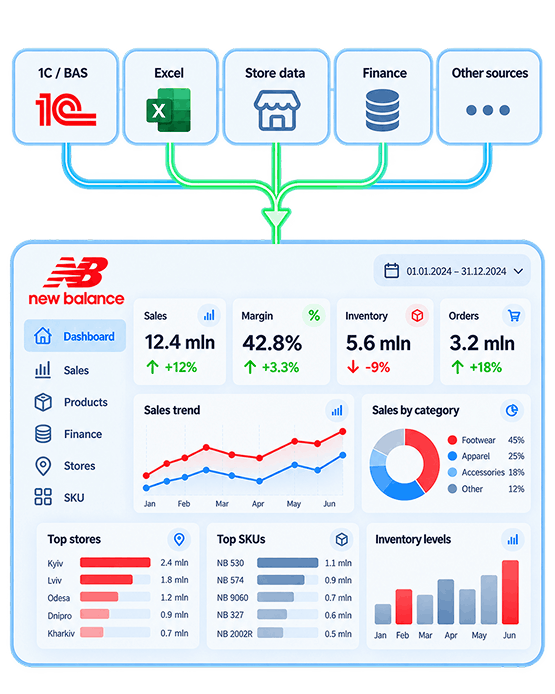
At the core of the solution, we built an automated integration between the ERP system and Power BI. New data now flows into the analytical model every day, is processed automatically, and refreshes the visualizations without any manual transfer to Excel.

The owner gets up-to-date metrics in one environment and can quickly move from the big picture to the level of detail they need. The analytics were built around three key areas of the business, each with its own dashboard.

Sales

The dashboard shows sales trends across different periods and allows results to be analyzed by store and SKU. The executive can see overall trends, compare performance, and drill down to individual products when needed.

Inventory

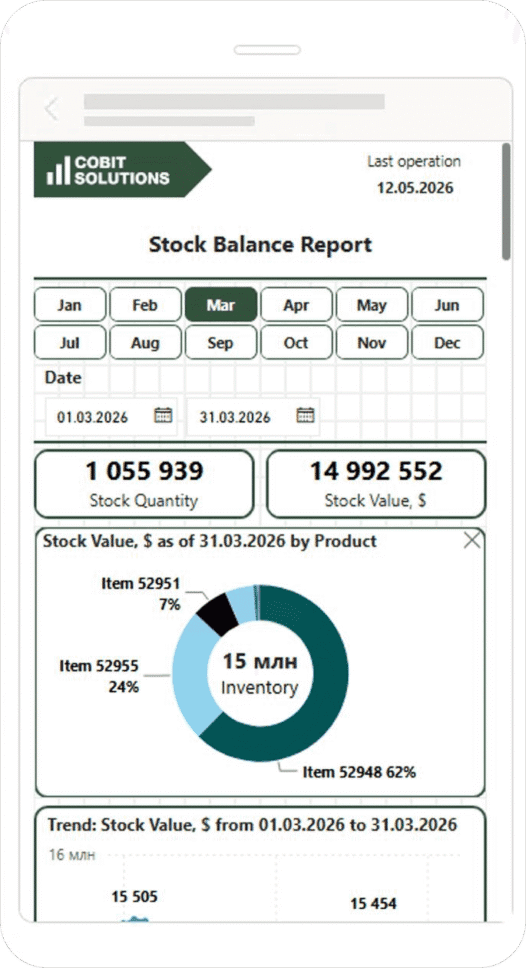
The analytics combine inventory levels, cost, and margin data. This makes it easier to monitor inventory structure, assess stock in the context of sales, and identify items that may require closer attention.

Cash

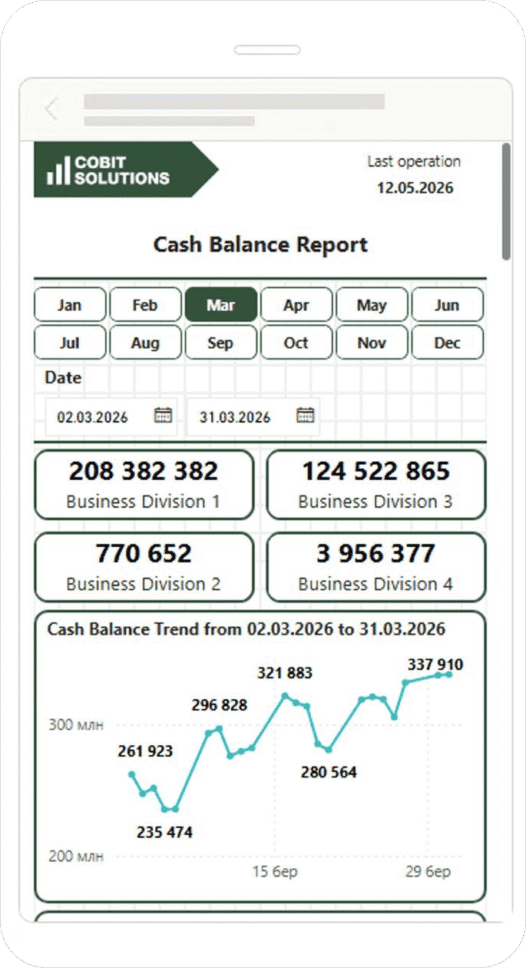
A separate dashboard consolidates cash balances across different accounts and locations. For foreign-currency balances, the team added a manually entered exchange rate: once the rate is updated, Power BI automatically recalculates the figures in the local currency.

What analytics can look like on a smartphone

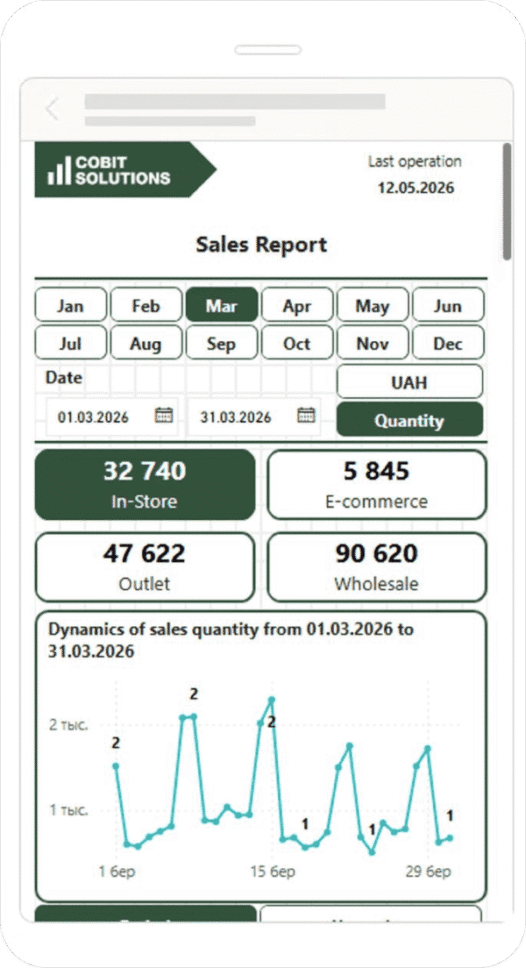
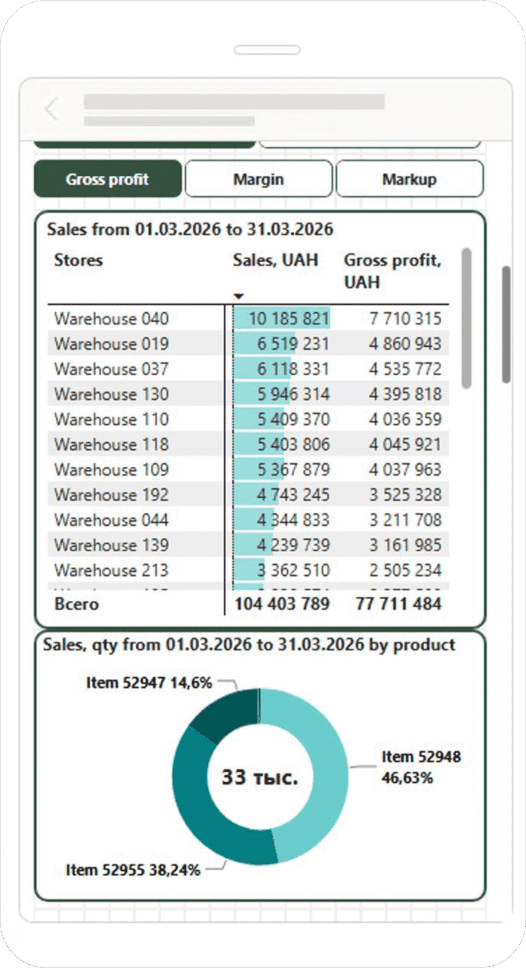
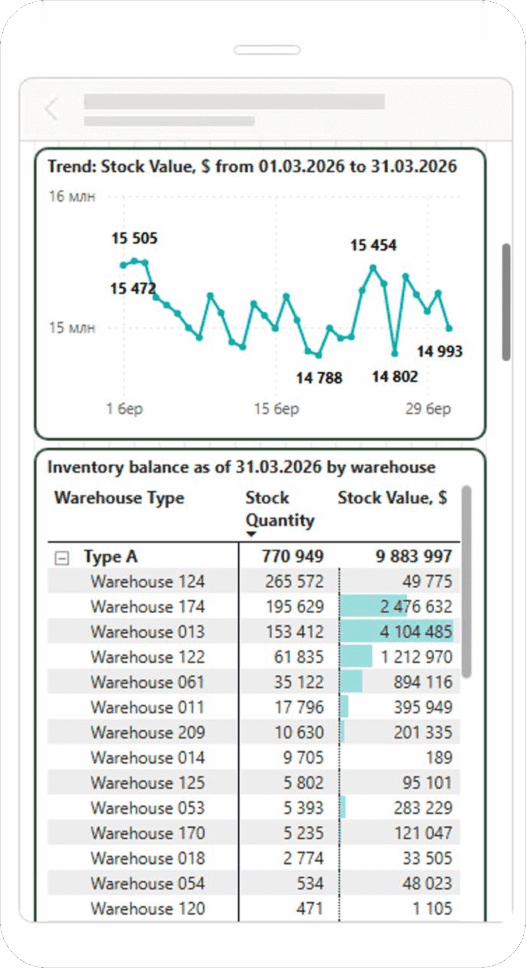
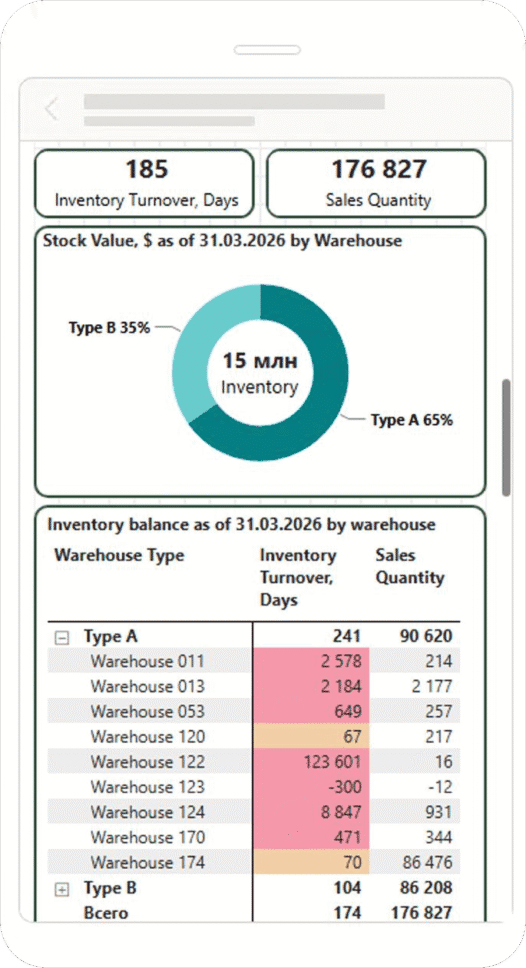
The mobile format makes it possible to view key metrics without being tied to a computer and quickly access the information you need. Below are demo versions of 6 mobile dashboards that illustrate how analytics can be organized on a smaller screen. The data shown in the visualizations is for demonstration purposes only.

Sales Dashboard
Gross Profit
Cash Balance Report
Stock Balance Report
Inventory Levels and Value
Inventory Turnover and Sales

Support to help the client master Power BI and improve the dashboards

Our job was not just to deliver finished dashboards, but also to show the client how to use them in day-to-day management scenarios. Even a well-designed dashboard cannot deliver its full value if users do not understand how to work with it.

Training with real dashboards

The team held online Zoom sessions using the web version of Power BI. During the training, we showed how to apply filters, interact with visualizations, and reset the dashboard to its original state after exploring different data views.

Recordings and post-training support

The training sessions were recorded so the client could revisit the explanations later. If additional questions came up afterward, the team joined follow-up sessions and helped work through specific use cases.

Feedback that helped improve the solution

The training also became another valuable source of feedback. During the first demonstrations, we could see which elements caused difficulties, which filters needed more explanation, and where the interface could be simplified. As a result, the client was learning how to use Power BI while we continued refining the system around real-world workflows.

3 million rows of data in one BI system

The Cobit Solutions team automated New Balance’s data workflows. Information from the ERP system now flows automatically into Power BI and refreshes the dashboards. The final solution preserves the required level of detail while remaining easy to understand for a user with no prior BI experience.

≈2 weeks

to deliver the first working dashboard. The team used it to reconcile the data with New Balance’s existing reports, verify the calculations, and determine which records and filters were needed for further analysis.

≈3 million rows

was the approximate volume of data in the system. The information is detailed by date, point of sale, and individual SKU, allowing the owner to move from high-level metrics to the level of analysis needed.

3 dashboards

cover sales, inventory, and cash balances. Each area supports a specific management task, while together they provide a complete view of the business.

Daily refreshes

replaced regular manual exports from the ERP system, Excel processing, and repeated chart creation. Once new information is entered, the system automatically sends it to Power BI and refreshes the analytics.

Manual report preparation became a thing of the past

According to the Cobit Solutions developer, New Balance specialists previously exported data, processed it manually, and created the required charts separately. After Power BI was implemented, this process virtually disappeared: once new data is entered into the ERP system, it appears in the ready-to-use analytics after the scheduled refresh.

The reporting workflow also changed for the executive team. Instead of gathering information from different departments and combining it manually, they now have a single system with access to key metrics across the retail network and the ability to drill down into details immediately.

A new approach to the interface

Client feedback continuously shaped the system’s functionality, interface structure, and the way users interact with metrics. This led to interactive KPI cards, additional drill-down scenarios, and a separate design logic for the mobile version.

As a result, New Balance received a BI solution that combines automation, a substantial volume of detailed data, and a thoughtfully designed user experience. Cobit Solutions once again demonstrated its flexibility and ability to adapt BI solutions to each client’s specific goals, experience, and real-world workflows.

Frequently Asked Questions

We take on projects at different stages — from data preparation and architecture design to Power BI implementation, reporting automation, and ongoing analytics development after launch. Our experience spans retail, manufacturing, distribution, finance, and other industries. In each case, the team works around the client’s specific business goals, data structure, and real user scenarios.

Clients benefit from expertise across several areas:

  • BI and Power BI — management dashboards, reporting automation, and analytics tailored to different user roles.
  • Data integration — bringing together information from ERP, CRM, Excel, and other systems.
  • Data warehousing — designing the architecture for centralized analytics and future scalability.
  • Data quality — cleaning, standardizing, and validating data before reporting is built.
  • Advanced analytics — forecasting, modeling, and support for more complex business scenarios.

We also stay involved after the system goes live. We help define requirements, test the solution against real-world scenarios, train the team, and continue improving the analytics based on user feedback.

Yes. A BI solution can grow along with the business by adding new metrics, data sources, dashboards, and areas of analysis. This makes it possible to address new needs over time without rebuilding the entire system each time.
Before expanding the solution, we review the existing architecture and assess how new data or functionality will affect the current model. This keeps the analytics development consistent and manageable.

To get started, it is enough to understand the business need and have access to the main data sources. A completed technical specification or a fully designed dashboard is not required.

During the project, we help identify the priority metrics, the necessary data views, the relevant data sources, and the logic of the future analytics solution. This means a project can begin even while the company is still defining its BI requirements.

Yes. A company can begin with its highest-priority needs, such as sales, finance, or inventory. This makes it possible to get a working result faster, validate the approach in practice, and define requirements for the next areas. The system can then be expanded gradually with new data, metrics, and use cases.

We start with the management questions the business needs answered on a regular basis. Then we identify the relevant metrics, the required level of detail, and the data sources needed to support them. This approach keeps the first version of the analytics focused on information that directly supports decision-making, with additional metrics added later as the system evolves.

After launch, the team helps the client fully transition to the new analytics environment. We can provide training, answer user questions, collect feedback, and identify areas for further improvement. As business processes change, new data sources appear, or new management needs emerge, the BI solution can be expanded accordingly.

You can also explore our other case studies

Cobit Solutions Cobit Solutions